| Image found at sec.gov |
According to Wikipedia - another 21st-Century tool (albeit developed in the late 20th century):
A visual dictionary is a dictionary that primarily uses pictures to illustrate the meaning of words. Visual dictionaries are often organized by themes, instead of being an alphabetical list of words. For each theme, an image is labeled with the correct word to identify each component of the item in question. Visual dictionaries can be monolingual or multilingual, providing the names of items in several languages. An index of all defined words is usually included to assist finding the correct illustration that defines the word.
Option 1: In 2007 Merriam-Webster (the dictionary and 'language reference publisher') and QA International (a developer and producer of visually innovative reference works) joined to develop and introduce the Visual Dictionary Online (www.visualdictionaryonline.com).
In 2007 when it was first launched (according to Merriam-Webster):
"Visitors ... search ideas within organized subject fields to...more than 20,000 terms with full definitions... 6,000 stunning illustrations...15 major themes offer a variety of topics..Additional features include a Game of the Week, played by associating words with images, and audio pronunciations spoken by real voices.Two years later Merriam-Webster/QA International boasted that their Visual Multimedia 4th Edition includes:
- 6,000 hyperrealist illustrations
- 20,000 defined terms covering almost 800 topics
- Grouped into 17 themes that present every aspect of everyday life, from sports, astronomy, the human body and the arts to cooking, gardening and the animal kingdom.
- Several language interfaces (terms written and pronounced in English, French, Spanish, Italian, and German)
- It also offers five different games that measure the knowledge of the user in each subject.

As you arrive at this website, a random word appears on the screen (until you enter a specific word of your choice). That word is clearly written and related words are visually linked (much like a neural mind map) illustrating how they are related to each other. Move the icon over each related word and a definition appears. A color-coded key appears on the side to help you visually learn:
- each word's part of speech (nouns are blue, verbs are green, adjectives are peach, and adverbs are pink),
- topic domains,
- cause-effect relationships between words,
- opposites (red),
- "instances" (examples - are turquoise),
- "is a member of" (yellow),
- "is a part of" (aqua),
- "is a substance of" (brown),
- "is similar to" (orange),
- and shows derivations (gray).
As directed on their website:
"Look up words to find their meanings and associations with other words and concepts.... Enter words into the search box...double-click a node to expand the tree. Click and drag the background to pan around and use the mouse wheel to zoom. Hover over nodes to see the definition and click and drag individual nodes to move them around to help clarify connections.
"...type a word into the search query at the top of the page and press 'Enter'. A network of nodes or 'synsets' (a single concept that is represented by a number of terms or synonyms) will spring out from the word that you entered... For example when you look up "seem", you see that the word is connected to four synsets each represented by a green circle. Green denotes verbs... Two of these synsets have the lone word "seem"; one has two terms: "appear" and "seem"; and the third has three terms: "look", "appear" and "seem". Each of the four synsets has its own definition. Hovering over a node with the mouse will reveal all of the synonyms for a given synset as well as its definition. Some synsets will also show a few examples of usage. These synsets link to each other and to other synsets according to entries in the WordNet database...You can grab any node and pull it away from the others to clarify connections."Here's one example..."Welcome::

And another example..."Grammar":
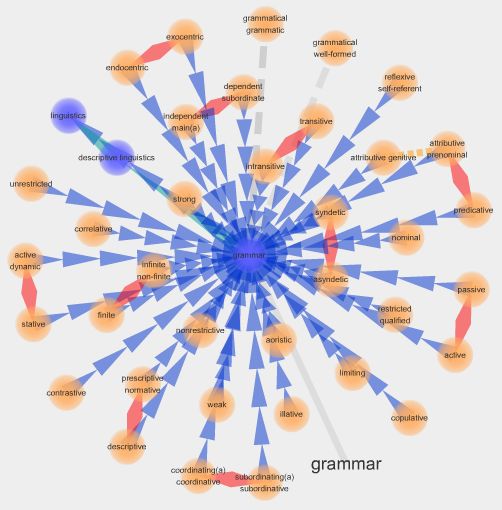
I could literally spend hours looking up words, not only to learn more about them but to look at the very different visual maps each produced.
Vidictionary : Is a new online video dictionary. it defines and expresses words through images. Click on the target word and a window opens up with a video describing the word and while it is (usually) read and has music to help describe it. Words can be accessed
- alphabetically
- by parts of speech (verbs, nouns, adverbs, adjectives, and prepositions.
- via "collections" (animals, color, geography, materials, onomatopoeia, objects, places, prefix, spatial, sports and games, transportation, video & photo FX, water, and weather.
- featured words
Finally, before closing here is one more related option...VOCABAHEAD:
Vocabahead promotes itself as a multi-sensory vocabulary trainer but can be used as a dictionary/thesaurus as well. What's nice about VocabAhead is that it really is a multi-media means to study and build vocabulary. You enter a word, it gives you a verbal definition, an audio recording 'reads' the definition, they use the word in a sentence, and an illustration reinforces the word's meaning. Another nice feature is that you can create your own vocabulary lists to study. There are graded word lists (grases 6-11) as well as a Master List and SAT list. In my opinion, while this is not terribly interactive, the paired illustrations, definitions and audio components can help build memory and word associations. Here is a YouTube introductory link (and note there are iphone apps for this as well):
So what do you think about 21st-century learning tools and the direction they're taking? Please share your opinioins in the comments.
In the meantime, thank you for your visit.
In the meantime, thank you for your visit.
The 21st-century is still relatively young and our visions of what it offers are young as well. Don't forget to leave your reactions, suggestions and visions of what 21st-century tools might look like in the comments.
